The Estate Explorer

The Question
The hierarchy people already carry in their heads — portfolio, estate, block, core, flat. Each level holds its own status and the actions attached to it.
The Reframe


Drill from estate to flat, stopping at whatever level answers the question
Demo
Try it yourself
This is the real drill-down officers use. Start with an estate, narrow to a block, a core, a flat.
Try it
output
Search Results

What used to take several tools and a phone call now takes one search. The hierarchy people already carry in their heads became the way they navigate the system.
Onward journeys
From overview to issue
We ran experimentation on how to present the most urgent actions on the page and how to obtain a quick summary as a user version three is where we landed based on feedback. The more detail the better here.
v1

v2
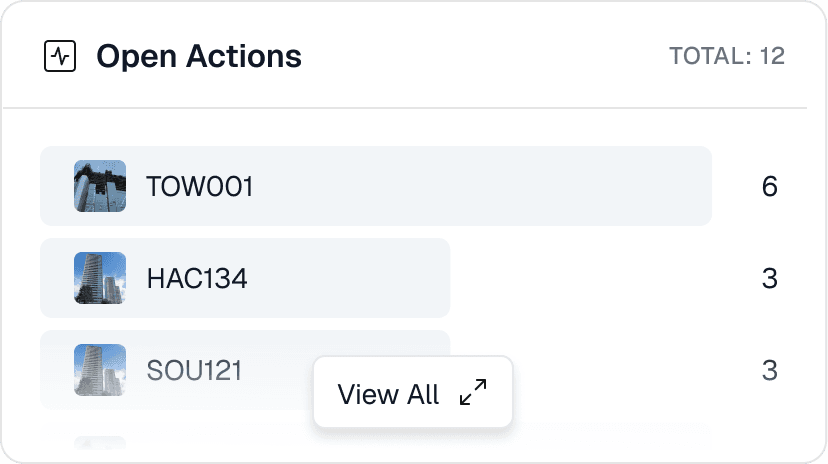
v3

Each pass asked a sharper question: is it compliant, where are the problems, what do I do first.
The job was never to report a status, it was to be a way in. Each pass turned more of the card into something you could act on.
Plain language over codes: a firefighters switch that fails to recall the lift, not just an asset ID.
the destination
One action, everything in one place
This is where the onward journey lands. Open an action and the whole story is on one screen: the fault and where it sits, the component and the standard it answers to, the property around it, the documents behind it, and the evidence that it was fixed.

It pulls the action, the property, the component and the documents into one view, so the work does not start with a hunt across different systems.
The original fault and the evidence of the fix sit side by side, so approval is a judgement on evidence.
Overdue, pending, stalled. The state is stated plainly at the top, so a late action cannot quietly slip.
Programme view
The same data, one level up
Every asset already carries its status, its standard, and its evidence, so the moment you stop asking about one property and ask about all of them, that data becomes a picture. Seventy five thousand doors resolve into what is inspected, what is outstanding, and where the gaps sit by quarter and by type. The officer moves from fixing one fault to seeing the whole estate at once, and a regulator gets the answer to "how are we doing" in a glance instead of a data request.

Design system
The system grew with the product
Every screen in this case study is assembled from the same kit, and that kit was not planned in advance. Each pattern earned its place by being needed on a real screen first, then pulled back into the system, named, and standardised so the next screen inherited it. Dropzones, data cards, breadcrumbs, dialogs, the navigation, dozens of components, all shaped by the product rather than guessed ahead of it.
track and measure
From search to done in under a minute
I instrumented the workflow with Pendo to check the onward journey holds up in real use, not just on the screen. Across 3735 visitors, getting from a search to the action page and through the approval runs at a median of forty five seconds. Most people finish inside fifteen minutes, with only a thin tail beyond. The thing that used to mean hopping between a register, a document store and an inbox now measures under a minute.
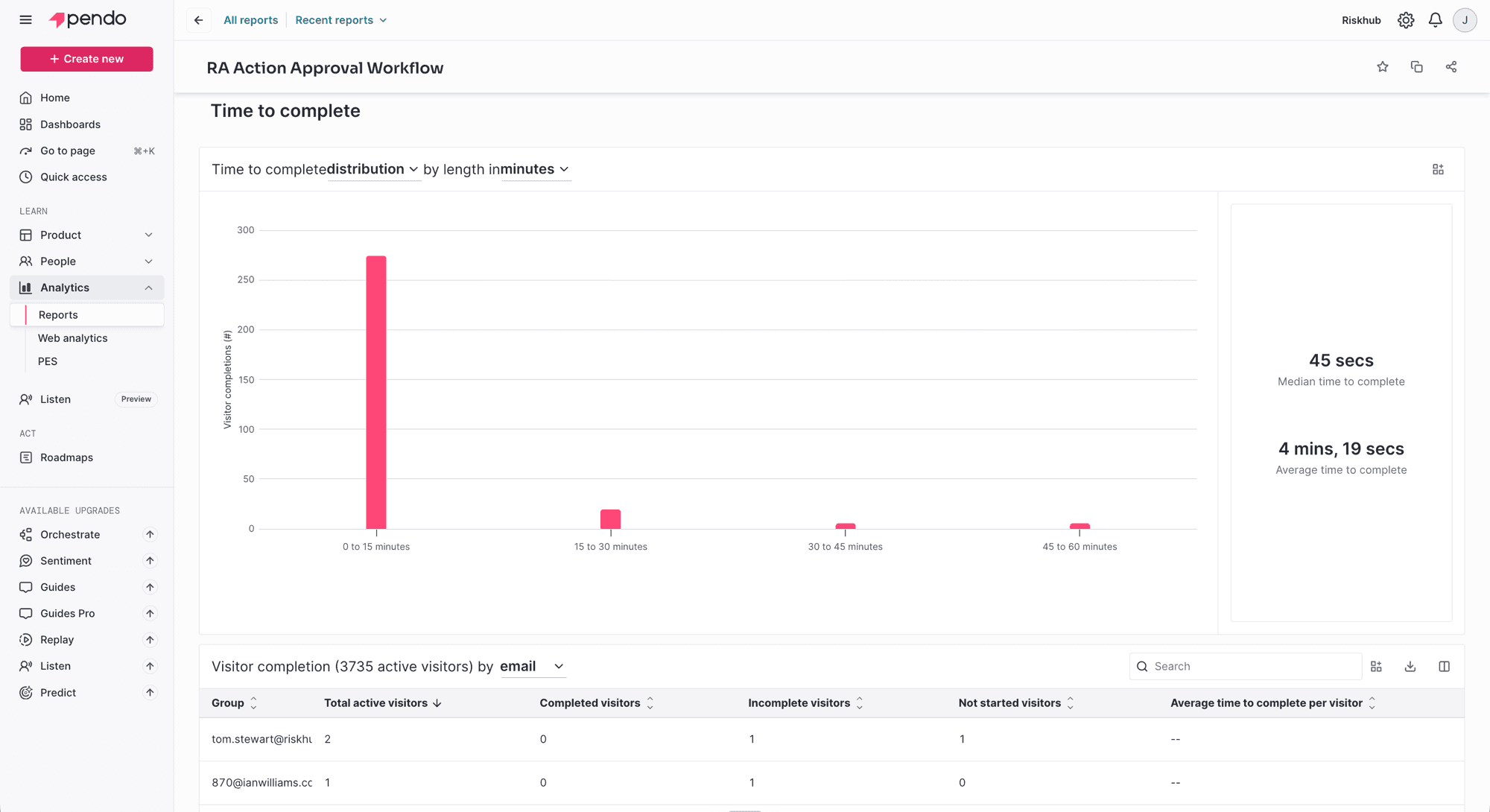
Median forty five seconds, average four minutes nineteen. The typical run is quick, and the average only climbs on a handful of long sessions.